1. Introduction
The primitive data types in Java are not objects as already discussed. If we want to use these data types as objects, then we will have to use wrapper classes for each of these primitive data types provided in java.lang package.
There are many built-in classes, which cannot handle primitive data types as they deal only with objects. One such class is Vector, which is used to store a collection of objects. We cannot use
the Vector class to directly store the collection of elements of a primitive data type. But we can do so by storing the objects of wrapper classes, which correspond to the primitive data types.
Java has a wrapper class corresponding to each of the primitive data types as shown in the following table:

2. Number class
The abstract class Number defines a super-class that is implemented by the classes that wrap the numeric types byte, short, int, long, float, and double. The number class has abstract methods that return the value of the object in each of the different number formats. These methods are:


The values returned by byteValue(), shortValue(), intValue(), longValue(), floatValue() and doubleValue() methods may involve rounding or truncation.
Example: The following example demonstrates how rounding and truncation take place when invoking methods of class Number.
class Wrapper
{ public static void main(String args[])
{ Integer iObj = new Integer(257);
System.out.println(iObj.byteValue());//truncation
Long lObj = new Long(123456789123456789L);
System.out.println(lObj);
System.out.println(lObj.doubleValue());
Float fObj=new Float(3.99f);
System.out.println(fObj.intValue());//truncation
}
}
Output:
1
123456789123456789
1.23456789123456784E17
3
3. Converting Primitive Numbers to Objects using Constructors of Wrapper
Classes and Converting Numeric Objects Back to Primitive Numbers
Example: The following example demonstrates how primitives can be wrapped in objects and how they can be converted back to primitives.
class Convert
{ public static void main(String args[])
{ System.out.println("Converting primitive numbers to objects "+
"using constructor");
byte b=105;
Byte bObj=new Byte(b);
System.out.println(bObj);
short s=2015;
Short sObj=new Short(s);
System.out.println(sObj);
int i=32717;
System.out.println(iObj);
long l=234543335565675L;
Long lObj=new Long(l);
System.out.println(lObj);
float f=3.1415f;
Float fObj=new Float(f);
System.out.println(fObj);
double d=3.1415;
Double dObj=new Double(d);
System.out.println(dObj);
System.out.println("Converting numeric objects to primitive numbers");
byte b1=bObj.byteValue();
short s1=sObj.shortValue();
int i1=iObj.intValue();
long l1=lObj.longValue();
float f1=fObj.floatValue();
double d1=dObj.doubleValue();
System.out.println(b1);
System.out.println(s1);
System.out.println(i1);
System.out.println(l1);
System.out.println(f1);
System.out.println(d1);
}
}
Output:
Converting primitive numbers to objects using constructor
105
2015
32717
234543335565675
3.1415
3.1415
Converting object numbers to primitive numbers
105
2015
32717
234543335565675
3.1415
3.1415
4. Converting Primitive Numbers to Strings using toString() static method of the corresponding Wrapper Class
class ConvertPrimitiveToString
{
public static void main(String args[])
{
System.out.println("Converting primitive numbers to String "+
"using toString() static method of corresponding wrapper class:");
byte b=105;
String str=Byte.toString(b);
System.out.println(str);
short s=303;
str=Short.toString(s);
System.out.println(str);
int i=100;
str=Integer.toString(i);
System.out.println(str);
long l=4544444444444l;
str=Long.toString(l);
System.out.println(str);
float f=3.444f;
str=Float.toString(f);
System.out.println(str);
double d=3.44444;
str=Double.toString(d);
System.out.println(str);
}
}
Output:
Converting primitive numbers to String using toString() static method of corresponding wrapper
class:
105
303
100
4544444444444
3.444
3.44444
5. Converting Numeric Objects to Strings using toString() method of the corresponding Wrapper Class
Example:
class ObjectToStringDemo
{
{
System.out.println("Converting object numbers to Strings using "+
"toString() method of corresponding wrapper class:");
byte b=103;
Byte bObj=new Byte(b);
String str=bObj.toString();
System.out.println(str);
short s=203;
Short sObj=new Short(s);
str=sObj.toString();
System.out.println(str);
Integer iObj=new Integer(32000);
str=iObj.toString();
System.out.println(str);
str=new Long(4544444444444l).toString();
System.out.println(str);
str=new Float(3.1444f).toString();
System.out.println(str);
str=new Double(4.1444).toString();
System.out.println(str);
}
}
Output:
Converting object numbers to Strings using toString() method of the corresponding wrapper class:
103
203
32000
4544444444444
3.1444
4.1444
6. Converting String Objects (Numeric Strings) to Numeric Objects using the static valueOf() method of the corresponding Wrapper Class
Example:
class StringToNumericObjectDemo
{ public static void main(String args[])
{ String str="30";
String str2="30.333";
Byte bObj=Byte.valueOf(str);
//Byte bObj1=new Byte(str2); //NumberFormatException
Short sObj=Short.valueOf(str);
Integer iObj=Integer.valueOf(str);
Long lObj=Long.valueOf("344324232432");
Float fObj=Float.valueOf("3.333");
Double dObj=Double.valueOf(str2);
System.out.println(bObj);
System.out.println(sObj);
System.out.println(iObj);
System.out.println(lObj);
System.out.println(fObj);
System.out.println(dObj);
}
}
Output:
30
30
30
344324232432
3.333
30.333
Note: All of the valueOf( ) methods throw “NumberFormatException” if the string does not contain a parsable number.
7. Converting String Objects (Numeric Strings) to Numeric Objects using Constructor of the corresponding Wrapper Class
Example:
class StringToNumericObjectDemo1
{ public static void main(String args[])
{ String str=new String("30");
//String str="30";
String str2=new String("30.333");
Byte bObj=new Byte(str);
//Byte bObj1=new Byte(str2); //NumberFormatException
Short sObj=new Short(str);
Integer iObj=new Integer(str);
Long lObj=new Long(str);
Float fObj=new Float(str2);
Double dObj=new Double(str2);
System.out.println(sObj);
System.out.println(iObj);
System.out.println(lObj);
System.out.println(fObj);
System.out.println(dObj);
}
}
Output:
30
30
30
30
30.333
30.333
Note: The Above constructors throw “NumberFormatException” if the string does not contain a parsable number.
8. Converting String Objects (Numeric Strings) to Primitive Numbers using parsing method of the corresponding Wrapper Class
Example:
class StringToPrimitiveDemo
{ public static void main(String args[])
{ String str=new String("30");
//String str="30";
String str2=new String("30.333");
byte b=Byte.parseByte(str);
//byte b1=Byte.parseByte(str2); //NumberFormatException
short s=Short.parseShort(str);
int i=Integer.parseInt(str);
long l=Long.parseLong(str);
float f=Float.parseFloat(str2);
double d=Double.parseDouble(str2);
System.out.println(b);
System.out.println(s);
System.out.println(i);
System.out.println(l);
System.out.println(f);
System.out.println(d);
}
}
Output:
30
30
30
30.333
30.333
Note: parseXXX( ) methods throw “NumberFormatException” if the string does not contain a parsable number.
9. Constants defined in classes Double and Float
MAX_VALUE
MIN_VALUE
NaN
NEGATIVE_INFINITY
POSITIVE_INFINITY
TYPE (The Class instance representing the primitive type double/float)
SIZE (The number of bits used to represent a double value). Since J2SDK 1.5.
10. Other Methods in Float Class

Methods in the Double class are almost the same as methods of the Float Class; with the use of double and Double words instead of float and Float words in the previous table.
12. Constants defined in classes Byte, Short, Integer and Long
MIN_VALUE
MAX_VALUE
TYPE (The Class instance representing the primitive type byte/short/int/long)
SIZE The number of bits used to represent a byte/short/int/long value in two's complement binary form. Since J2SDK 1.5.
13. Other Methods in Byte Class
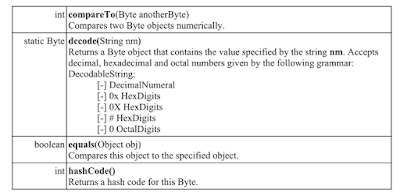
Methods in the Short class are the same as methods of the Byte class, with the use of short and Short words instead of byte and Byte words in the above table.


16. Other Methods in Integer Class
Methods in the Long class are almost the same as methods of the Integer Class.
17. Character Class
The Character class wraps a value of the primitive type char in an object.
Constructor
Character(char value)
Constructs a newly allocated Character object that represents the specified char value.
Example: Character chObj = new Character(‘A’);
Methods
Some of the methods of Character class are described in the following table:


class CharacterDemo1
{ public static void main(String args[])
{ char ch[]={'a', 'b','5','?','A',' '};
for(int i=0; i<ch.length;i++)
{ if(Character.isLowerCase(ch[i]))
if(Character.isDigit(ch[i]))
if(Character.isLetter(ch[i]))
if(Character.isUpperCase(ch[i]))
if(Character.isWhitespace(ch[i]))
System.out.println(ch[i]+" is lowercase");
System.out.println(ch[i]+" is a digit");
System.out.println(ch[i]+" is a letter");
System.out.println(ch[i]+" is in uppercase");
}
System.out.println(Character.isLetter(65)); //for 'A'
System.out.println(Character.isLetter(64)); //for '@'
}
}
Output:
a is lowercase
a is a letter
b is lowercase
b is a letter
5 is a digit
A is a letter
A is in uppercase
is a whitespace
true
false
18. Boolean Class
The Boolean class wraps a value of the primitive type boolean in an object.
18.1 Constructors

18.2 Methods of Boolean Class


The primitive data types in Java are not objects as already discussed. If we want to use these data types as objects, then we will have to use wrapper classes for each of these primitive data types provided in java.lang package.
There are many built-in classes, which cannot handle primitive data types as they deal only with objects. One such class is Vector, which is used to store a collection of objects. We cannot use
the Vector class to directly store the collection of elements of a primitive data type. But we can do so by storing the objects of wrapper classes, which correspond to the primitive data types.
Java has a wrapper class corresponding to each of the primitive data types as shown in the following table:

2. Number class
The abstract class Number defines a super-class that is implemented by the classes that wrap the numeric types byte, short, int, long, float, and double. The number class has abstract methods that return the value of the object in each of the different number formats. These methods are:


Example: The following example demonstrates how rounding and truncation take place when invoking methods of class Number.
class Wrapper
{ public static void main(String args[])
{ Integer iObj = new Integer(257);
System.out.println(iObj.byteValue());//truncation
Long lObj = new Long(123456789123456789L);
System.out.println(lObj);
System.out.println(lObj.doubleValue());
Float fObj=new Float(3.99f);
System.out.println(fObj.intValue());//truncation
}
}
Output:
1
123456789123456789
1.23456789123456784E17
3
3. Converting Primitive Numbers to Objects using Constructors of Wrapper
Classes and Converting Numeric Objects Back to Primitive Numbers
Example: The following example demonstrates how primitives can be wrapped in objects and how they can be converted back to primitives.
class Convert
{ public static void main(String args[])
{ System.out.println("Converting primitive numbers to objects "+
"using constructor");
byte b=105;
Byte bObj=new Byte(b);
System.out.println(bObj);
short s=2015;
Short sObj=new Short(s);
System.out.println(sObj);
int i=32717;
Integer iObj=new Integer(i);
System.out.println(iObj);
long l=234543335565675L;
Long lObj=new Long(l);
System.out.println(lObj);
float f=3.1415f;
Float fObj=new Float(f);
System.out.println(fObj);
double d=3.1415;
Double dObj=new Double(d);
System.out.println(dObj);
System.out.println("Converting numeric objects to primitive numbers");
byte b1=bObj.byteValue();
short s1=sObj.shortValue();
int i1=iObj.intValue();
long l1=lObj.longValue();
float f1=fObj.floatValue();
double d1=dObj.doubleValue();
System.out.println(b1);
System.out.println(s1);
System.out.println(i1);
System.out.println(l1);
System.out.println(f1);
System.out.println(d1);
}
}
Output:
Converting primitive numbers to objects using constructor
105
2015
32717
234543335565675
3.1415
3.1415
Converting object numbers to primitive numbers
105
2015
32717
234543335565675
3.1415
3.1415
4. Converting Primitive Numbers to Strings using toString() static method of the corresponding Wrapper Class
Example:
class ConvertPrimitiveToString
{
public static void main(String args[])
{
System.out.println("Converting primitive numbers to String "+
"using toString() static method of corresponding wrapper class:");
byte b=105;
String str=Byte.toString(b);
System.out.println(str);
short s=303;
str=Short.toString(s);
System.out.println(str);
int i=100;
str=Integer.toString(i);
System.out.println(str);
long l=4544444444444l;
str=Long.toString(l);
System.out.println(str);
float f=3.444f;
str=Float.toString(f);
System.out.println(str);
double d=3.44444;
str=Double.toString(d);
System.out.println(str);
}
}
Output:
Converting primitive numbers to String using toString() static method of corresponding wrapper
class:
105
303
100
4544444444444
3.444
3.44444
5. Converting Numeric Objects to Strings using toString() method of the corresponding Wrapper Class
Example:
class ObjectToStringDemo
{
public static void main(String args[])
{
System.out.println("Converting object numbers to Strings using "+
"toString() method of corresponding wrapper class:");
byte b=103;
Byte bObj=new Byte(b);
String str=bObj.toString();
System.out.println(str);
short s=203;
Short sObj=new Short(s);
str=sObj.toString();
System.out.println(str);
Integer iObj=new Integer(32000);
str=iObj.toString();
System.out.println(str);
str=new Long(4544444444444l).toString();
System.out.println(str);
str=new Float(3.1444f).toString();
System.out.println(str);
str=new Double(4.1444).toString();
System.out.println(str);
}
}
Output:
Converting object numbers to Strings using toString() method of the corresponding wrapper class:
103
203
32000
4544444444444
3.1444
4.1444
6. Converting String Objects (Numeric Strings) to Numeric Objects using the static valueOf() method of the corresponding Wrapper Class
Example:
class StringToNumericObjectDemo
{ public static void main(String args[])
{ String str="30";
//String str=new String("30");
String str2="30.333";
Byte bObj=Byte.valueOf(str);
//Byte bObj1=new Byte(str2); //NumberFormatException
Short sObj=Short.valueOf(str);
Integer iObj=Integer.valueOf(str);
Long lObj=Long.valueOf("344324232432");
Float fObj=Float.valueOf("3.333");
Double dObj=Double.valueOf(str2);
System.out.println(bObj);
System.out.println(sObj);
System.out.println(iObj);
System.out.println(lObj);
System.out.println(fObj);
System.out.println(dObj);
}
}
Output:
30
30
30
344324232432
3.333
30.333
Note: All of the valueOf( ) methods throw “NumberFormatException” if the string does not contain a parsable number.
7. Converting String Objects (Numeric Strings) to Numeric Objects using Constructor of the corresponding Wrapper Class
Example:
class StringToNumericObjectDemo1
{ public static void main(String args[])
{ String str=new String("30");
//String str="30";
String str2=new String("30.333");
Byte bObj=new Byte(str);
//Byte bObj1=new Byte(str2); //NumberFormatException
Short sObj=new Short(str);
Integer iObj=new Integer(str);
Long lObj=new Long(str);
Float fObj=new Float(str2);
Double dObj=new Double(str2);
System.out.println(bObj);
System.out.println(sObj);
System.out.println(iObj);
System.out.println(lObj);
System.out.println(fObj);
System.out.println(dObj);
}
}
Output:
30
30
30
30
30.333
30.333
Note: The Above constructors throw “NumberFormatException” if the string does not contain a parsable number.
8. Converting String Objects (Numeric Strings) to Primitive Numbers using parsing method of the corresponding Wrapper Class
Example:
class StringToPrimitiveDemo
{ public static void main(String args[])
{ String str=new String("30");
//String str="30";
String str2=new String("30.333");
byte b=Byte.parseByte(str);
//byte b1=Byte.parseByte(str2); //NumberFormatException
short s=Short.parseShort(str);
int i=Integer.parseInt(str);
long l=Long.parseLong(str);
float f=Float.parseFloat(str2);
double d=Double.parseDouble(str2);
System.out.println(b);
System.out.println(s);
System.out.println(i);
System.out.println(l);
System.out.println(f);
System.out.println(d);
}
}
Output:
30
30
30
30
30.333
30.333
Note: parseXXX( ) methods throw “NumberFormatException” if the string does not contain a parsable number.
9. Constants defined in classes Double and Float
MAX_VALUE
MIN_VALUE
NaN
NEGATIVE_INFINITY
POSITIVE_INFINITY
TYPE (The Class instance representing the primitive type double/float)
SIZE (The number of bits used to represent a double value). Since J2SDK 1.5.
10. Other Methods in Float Class

11. Constants defined in classes Byte, Short, Integer and Long
12. Constants defined in classes Byte, Short, Integer and Long
MIN_VALUE
MAX_VALUE
TYPE (The Class instance representing the primitive type byte/short/int/long)
SIZE The number of bits used to represent a byte/short/int/long value in two's complement binary form. Since J2SDK 1.5.
13. Other Methods in Byte Class

14. Other Methods in Short Class
Methods in the Short class are the same as methods of the Byte class, with the use of short and Short words instead of byte and Byte words in the above table.
15. Other Methods in Integer Class


16. Other Methods in Integer Class
Methods in the Long class are almost the same as methods of the Integer Class.
17. Character Class
The Character class wraps a value of the primitive type char in an object.
Constructor
Character(char value)
Constructs a newly allocated Character object that represents the specified char value.
Example: Character chObj = new Character(‘A’);
Methods
Some of the methods of Character class are described in the following table:


Example:
class CharacterDemo1
{ public static void main(String args[])
{ char ch[]={'a', 'b','5','?','A',' '};
for(int i=0; i<ch.length;i++)
{ if(Character.isLowerCase(ch[i]))
if(Character.isDigit(ch[i]))
if(Character.isLetter(ch[i]))
if(Character.isUpperCase(ch[i]))
if(Character.isWhitespace(ch[i]))
System.out.println(ch[i]+" is lowercase");
System.out.println(ch[i]+" is a digit");
System.out.println(ch[i]+" is a letter");
System.out.println(ch[i]+" is in uppercase");
System.out.println(ch[i]+" is a whitespace");
}
System.out.println(Character.isLetter(65)); //for 'A'
System.out.println(Character.isLetter(64)); //for '@'
}
}
Output:
a is lowercase
a is a letter
b is lowercase
b is a letter
5 is a digit
A is a letter
A is in uppercase
is a whitespace
true
false
18. Boolean Class
The Boolean class wraps a value of the primitive type boolean in an object.
18.1 Constructors

18.2 Methods of Boolean Class


Example: The Stack class in the following example represents a generalized stack as it is using an array of objects to store the elements. The StackDemo class creates three instances and uses them to store primitive data types using wrapper classes.
class Stack
{
int top = -1;
int size;
Object a[];
Stack(int size)
{
this.size = size;
a = new Object[size];
}
void push(Object x)
{
if(top == size-1)
{
System.out.println("Stack Full");
return;
}
top = top + 1;
a[top] = x;
}
Object pop()
{
if(top == -1)
class Stack
{
int top = -1;
int size;
Object a[];
Stack(int size)
{
this.size = size;
a = new Object[size];
}
void push(Object x)
{
if(top == size-1)
{
System.out.println("Stack Full");
return;
}
top = top + 1;
a[top] = x;
}
Object pop()
{
if(top == -1)
{
return null;
}
Object x = a[top];
top = top - 1;
return x;
}
}
class StackDemo
{
public static void main(String args[])
{
Stack s1 = new Stack(10);
Stack s2 = new Stack(10);
Stack s3 = new Stack(10);
s3.push(new Integer(10));
s3.push(new Long(20L));
s3.push(new Float(13.5));
s3.push(new Double(14.5));
for(int i = 0; i < 10; i++)
{ s1.push(new Integer(i));
}
for(int i = 10; i < 20; i++)
{ s2.push(new Float(i+0.5));
}
Object x; int sum = 0;
for(int i = 0; i < 10; i++)
{ x = s1.pop(); System.out.print(x + " ");
int a = ((Integer)x).intValue();
sum = sum+a;
}
float fsum = 0;
System.out.println("\n sum: "+sum);
for(int i = 0; i < 10; i++)
{
x = s2.pop();
System.out.print(x +" ");
float f = ((Float)x).floatValue();
fsum = fsum+f;
}
System.out.println("\n sum: " + fsum);
double dsum = 0;
while((x = s3.pop()) != null)
return null;
}
Object x = a[top];
top = top - 1;
return x;
}
}
class StackDemo
{
public static void main(String args[])
{
Stack s1 = new Stack(10);
Stack s2 = new Stack(10);
Stack s3 = new Stack(10);
s3.push(new Integer(10));
s3.push(new Long(20L));
s3.push(new Float(13.5));
s3.push(new Double(14.5));
for(int i = 0; i < 10; i++)
{ s1.push(new Integer(i));
}
for(int i = 10; i < 20; i++)
{ s2.push(new Float(i+0.5));
}
Object x; int sum = 0;
for(int i = 0; i < 10; i++)
{ x = s1.pop(); System.out.print(x + " ");
int a = ((Integer)x).intValue();
sum = sum+a;
}
float fsum = 0;
System.out.println("\n sum: "+sum);
for(int i = 0; i < 10; i++)
{
x = s2.pop();
System.out.print(x +" ");
float f = ((Float)x).floatValue();
fsum = fsum+f;
}
System.out.println("\n sum: " + fsum);
double dsum = 0;
while((x = s3.pop()) != null)
{ System.out.print(x +" ");
if(x instanceof Integer)
if(x instanceof Long)
if(x instanceof Float)
if(x instanceof Double)
}
System.out.println("\n sum: " + dsum);
dsum= dsum + ((Integer)x).intValue();
dsum= dsum + ((Long)x).longValue();
dsum= dsum + ((Float)x).floatValue();
dsum= dsum + ((Double)x).doubleValue();
}
}
Output:
9 8 7 6 5 4 3 2 1 0
sum: 45
19.5 18.5 17.5 16.5 15.5 14.5 13.5 12.5 11.5 10.5
sum: 150.0
14.5 13.5 20 10
sum: 58.0
if(x instanceof Integer)
if(x instanceof Long)
if(x instanceof Float)
if(x instanceof Double)
}
System.out.println("\n sum: " + dsum);
dsum= dsum + ((Integer)x).intValue();
dsum= dsum + ((Long)x).longValue();
dsum= dsum + ((Float)x).floatValue();
dsum= dsum + ((Double)x).doubleValue();
}
}
Output:
9 8 7 6 5 4 3 2 1 0
sum: 45
19.5 18.5 17.5 16.5 15.5 14.5 13.5 12.5 11.5 10.5
sum: 150.0
14.5 13.5 20 10
sum: 58.0